
P6 schedule health check using DCMA-style metrics
The 14 DCMA schedule quality checks explained, with typical thresholds and how to run each one in Primavera P6.
On this page
The DCMA 14-point assessment is a set of schedule quality tests originally from the US Defense Contract Management Agency. It is not part of any NEC contract, but it is widely used by clients and Project Managers as a quick measure of how trustworthy a programme is. A programme that fails many of these tests is more likely to be questioned at acceptance.
Thresholds below are the commonly used ones. Some clients set their own, so check your Scope.
The 14 checks
| # | Check | What it measures | Typical threshold |
|---|---|---|---|
| 1 | Logic | Incomplete activities missing a predecessor or successor | 5% or less |
| 2 | Leads | Relationships with negative lag | 0% |
| 3 | Lags | Relationships with positive lag | 5% or less |
| 4 | Relationship types | Share of relationships that are finish-to-start | At least 90% |
| 5 | Hard constraints | Activities with mandatory or "on or before" constraints | 5% or less |
| 6 | High float | Activities with total float over 44 working days | 5% or less |
| 7 | Negative float | Activities forecast to miss a date | 0% |
| 8 | High duration | Activities with durations over 44 working days | 5% or less |
| 9 | Invalid dates | Forecast dates in the past, or actuals in the future | 0 |
| 10 | Resources | Activities with duration but no resources | Information only |
| 11 | Missed tasks | Activities that should have finished against baseline but have not | 5% or less |
| 12 | Critical path test | The critical path is continuous and drives the finish | Pass |
| 13 | Critical Path Length Index | Critical path length plus float, divided by critical path length | 0.95 or more |
| 14 | Baseline Execution Index | Activities completed divided by activities baselined to be complete | 0.95 or more |
Running the checks in P6
Most checks need a filter and a layout.
- Open the activities view and add columns for Total Float, Remaining Duration, Original Duration, Primary Constraint and the number of predecessors and successors.
- Filter for incomplete activities (Activity Status is not Completed).
- Logic: use the Predecessors and Successors detail windows, or filter on activities without relationships.
- Constraints: filter on Primary Constraint and review anything mandatory.
- Float: sort by Total Float. Anything negative is a problem; very large positive values suggest missing logic.
- Relationships: use Tools, Schedule Check, or export the relationships table and count types and lags.
- Dates: compare early dates for incomplete activities with the data date.
- Baseline checks (11 and 14): assign a baseline and compare finish dates.
Doing this by hand takes time and is easy to get wrong. That is why many planners automate it.
Reading the results with care
- A pass does not mean the programme is good. A programme can pass every check and still be unrealistic.
- A fail does not always mean a mistake. Some lags are legitimate, for example curing time. The point is to be able to justify each one.
- The critical path test is only as reliable as the logic. A path that is continuous can still be the wrong path.
- Checks 11 and 14 need a baseline. If your file has no baseline, they cannot be assessed.
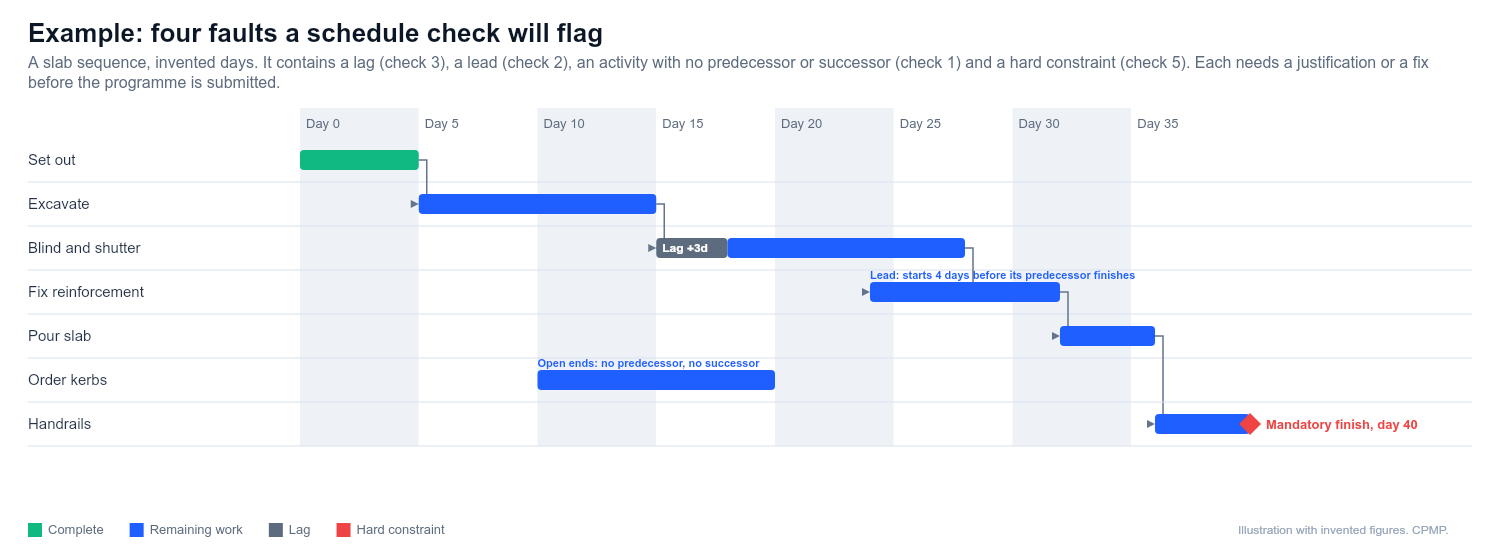
Fixing the common failures
- Missing logic: tie every activity to a predecessor and successor, with start and finish milestones as the only exceptions.
- Leads: replace with a start-to-start relationship and a positive lag, or split the activity.
- Hard constraints: remove them and let logic drive the dates. Use soft constraints for genuine external dates.
- High float: usually missing successors. Check the relationships out of those activities.
- Negative float: do not hide it. Find out why, and decide whether to mitigate or notify.
This guide is general information, not legal advice. Check it against your contract.