
Key Dates and sectional completion explained for programme builders
How Key Dates and sectional completion work in an NEC programme, and how to build, show and protect them when planning and revising.
On this page
Key Dates and sectional completion cause more programme problems than almost any other feature of an NEC contract. They look simple in the Contract Data and become complicated once real logic is attached. This guide explains the basics and how to handle them in a programme.
What they are
A Completion Date is the date by which the Contractor must complete the works. A Key Date is a date by which a stated condition must be met, such as access being given, a section being finished, or an interface being cleared. Key Dates are listed in the Contract Data, along with their conditions, and the Contractor's duty to meet each condition is in clause 30.3. Both dates can be changed by compensation events.
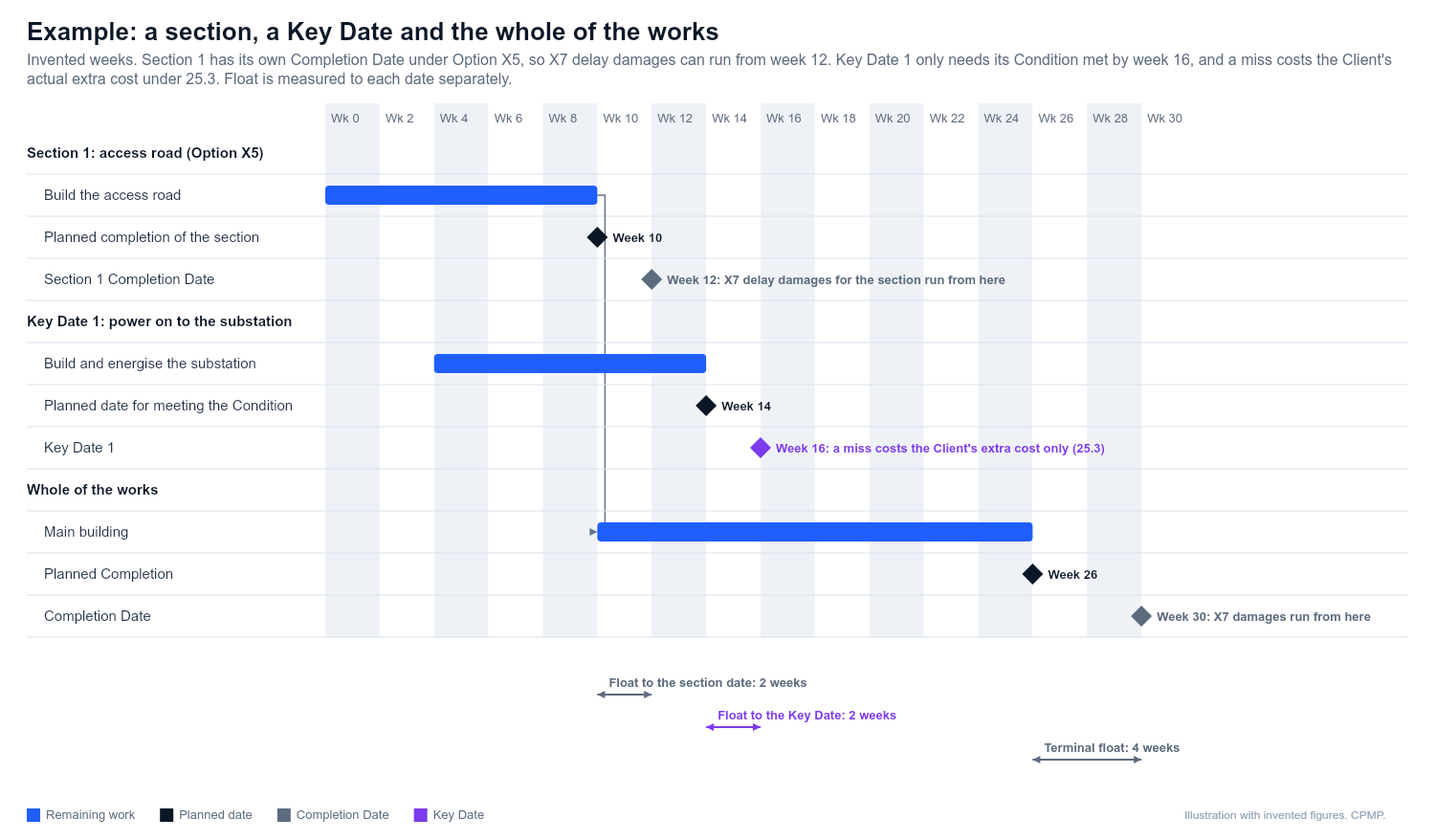
Sectional completion is where the works are split into sections, each with its own Completion Date. It comes from secondary Option X5: references to the works, Completion and the Completion Date then apply to each section as well as the whole, unless they refer expressly to the whole. The Contract Data lists each section with its description and date, Completion is certified for each section, and take over applies to each. If Option X7 is used, each section has its own daily rate for delay damages. Without X5, one Completion Date covers everything.
A Key Date is not a completion obligation. It does not need the work to be finished or the works to be handed over, only the stated condition to be met. If the Project Manager decides the condition was not met by the date, the Contractor pays the Client's actual additional cost caused by that (clause 25.3). It is not a daily rate, and if the Client has no extra cost there is nothing to pay. Use a section if the Client wants a part finished, taken over and covered by its own delay damages, and a Key Date if it just needs an interface cleared. Check your version and any Z clauses.
Why they matter to the programme
- The programme must show the Key Dates and their conditions (see the programme content clause, 31.2).
- A forecast miss of a Key Date is a matter for early warning (15.1 NEC4, 16.1 NEC3).
- A compensation event can move a Key Date as well as the Completion Date. The quotation must show this (clause 62.2). The delay to a Key Date is measured from the planned date for meeting the condition on the Accepted Programme (63.5 in NEC4, 63.3 in NEC3), in the same way as for planned Completion. The Project Manager can also change a Key Date by instruction, which is a compensation event under 60.1(4).
- Notification of a compensation event affecting a Key Date has the same eight-week limit (clause 61.3).
How to build them
- Set the date constraints carefully. Prefer milestone activities with "finish on or before" constraints used for monitoring, not hard constraints that stop the logic working.
- Build a milestone for each Key Date with a clear name, the Contract Data reference and the condition in the activity notes.
- Link the real activities that must be done before the condition is met. Do not rely only on date constraints.
- Use separate sections (activity codes or WBS) for each sectional completion, with their own finish milestone.
- Measure float to each date. Report float to each Key Date, not just to Completion. A programme can finish on time and still miss an early Key Date.
- Show access dates and Client-driven dates as external milestones, with their source.
Revising with Key Dates
When a revised programme is submitted, check each Key Date again.
- Has the date moved because of an assessed compensation event? If so, make sure the accepted change is reflected.
- Has it moved because of your own progress? If so, the forecast should show the true date, and an early warning should have been given.
- Does the narrative explain every movement? See writing a programme narrative.
Common mistakes
| Mistake | Effect |
|---|---|
| Hard-constraining a milestone to the Key Date | Hides negative float and misleads the reader |
| Leaving a Key Date off the programme | A ready reason for non-acceptance |
| Mixing sections in one finish milestone | Impossible to show sectional completion |
| Moving a Key Date in the file without a compensation event | Programme does not match the contract |
| Ignoring a Key Date linked to the Client's obligations | Missing evidence for a compensation event |
Practical checks
- List all Key Dates and sectional completion dates from the Contract Data and confirm each appears in the programme.
- Confirm which dates carry delay damages. Under Option X7 they run from the Completion Date of the whole or of a section, not from a Key Date, whose remedy is the Client's actual extra cost. Take advice where the amounts are significant.
- Read the programme alongside the clause 31 programme checklist and float and time risk allowance explained.
- Keep the Accepted Programme dates and your current forecast dates both visible, so movement is clear.
If your contract has multiple sections and complicated dependencies, a specialist planner is worth the cost. See hiring a P6 NEC planner.
Related guides
This guide is general information, not legal advice. Check it against your contract.