
What programme you need at tender for an NEC contract
What a tender programme should contain for an NEC contract, and how it becomes the first Accepted Programme once the contract is awarded.
On this page
Many contractors treat the tender programme as a bid document that gets thrown away after award. Under NEC that is a mistake. The tender programme is the starting point for the first programme you submit, and the Accepted Programme is what your time, cost and compensation events will be measured against. Build the tender programme as if you will have to defend it.
What the tender asks for
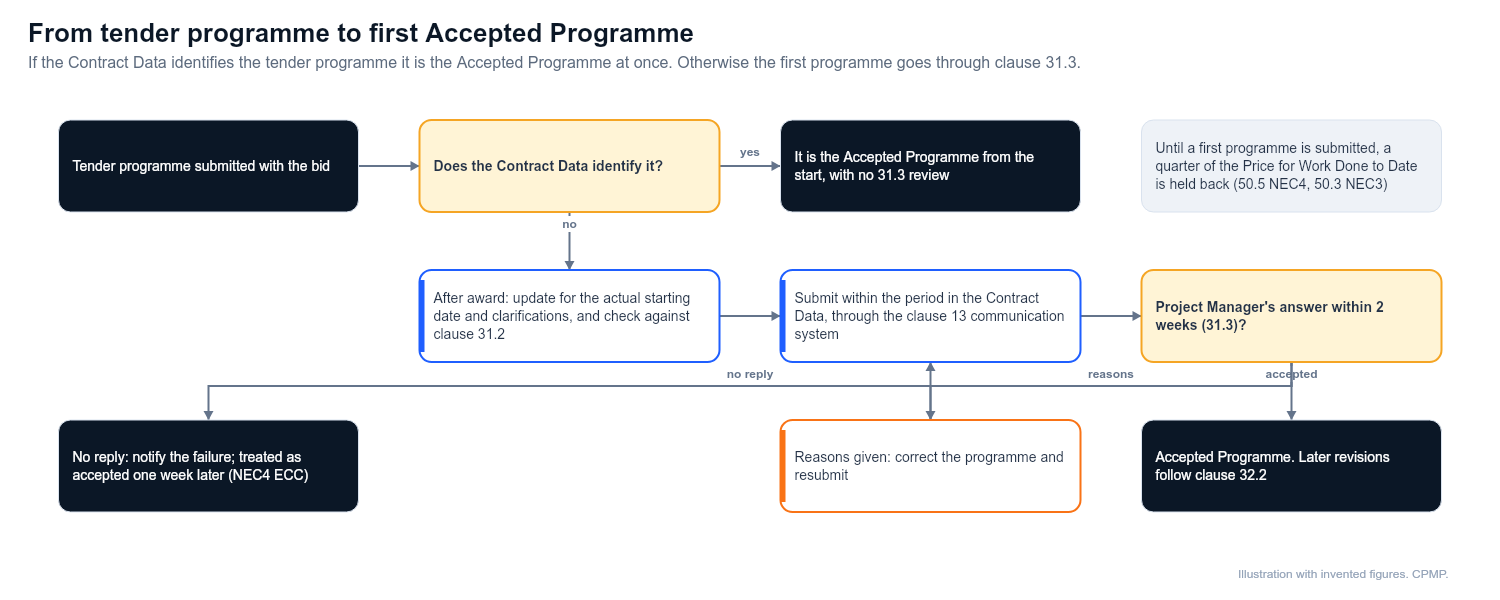
Read the tender instructions first. Clients often require a programme in a given format, with a method statement, resource profile or particular milestones. A tender programme only has contractual status from the start if the Contract Data identifies it. In that case it is the Accepted Programme without any review under clause 31.3, and no first programme is needed. Otherwise you must submit a first programme within the period in the Contract Data. Check what the tender says about this, and check any Z clauses.
What it should contain
The contract states the contents of a programme in clause 31.2. Build your tender programme so it can become the first programme without starting again. At a minimum it should show:
- The starting date, the Completion Date and any Key Dates
- The order and timing of the operations needed to do the work, including any commissioning and testing
- The dates by which you need access, information, plant, materials and decisions from the Client or others
- Provisions for float and for time risk allowances, shown openly, because clause 31.2 requires them
- The Client's activities and any third-party dependencies, such as consents or utility diversions
- Planned Completion, which may be earlier than the Completion Date
- The resources that support the logic, as the contract requires
Check clause 31.2 and the Scope in your contract for the full list, since Z clauses may add to it.
Build it so it can be accepted
The Project Manager has to accept the first programme or give reasons for not accepting it, within two weeks under clause 31.3, and may only refuse for one of four listed reasons. Until you have submitted a first programme showing the information the contract requires, a quarter of the Price for Work Done to Date is held back in each assessment where the Contract Data names none (clause 50.5 in NEC4, 50.3 in NEC3). A programme that is easy to read and check is much easier to accept. Practical points:
- Use a logic-driven network. Not a bar chart drawn by hand. Activities should be linked so that changes can be assessed properly later.
- Keep activity IDs and a WBS. They help you and the Project Manager track change.
- Show the critical path clearly. The longest path should be visible without effort.
- Make the calendar realistic. Include working patterns, weather, possessions and shutdowns.
- Include all Key Dates. Link them in so that a delay shows up.
- Show the Client's tasks. Review times, access dates and approvals belong on the programme.
- Add a short narrative. Explain the method, assumptions, risks and constraints.
For common reasons programmes are refused, see Why NEC programmes are not accepted.
From tender programme to first Accepted Programme
- Award. Read the signed Contract Data and Scope. Check what changed between tender and award.
- Update. Adjust dates to the actual starting date, include clarifications and remove any assumptions that no longer apply.
- Check against the contract contents. Use Clause 31 programme checklist.
- Submit. Send the first programme within the period the contract states, using the communication system under clause 13.
- Respond. If reasons for not accepting are given, correct the programme and resubmit.
- Accepted Programme. Once accepted, it becomes the Accepted Programme and later revisions follow under clause 32.2. Under NEC4 ECC it can also be treated as accepted if the Project Manager misses the two-week reply, you notify the failure and a further week passes with no answer.
Common tender mistakes
- Tendering with a high-level summary programme and nothing behind it
- Not stating the assumptions that the time depends on
- Programme dates that do not match the tender return or pricing
- Showing no float, or hiding float in durations
- Ignoring Client activities and approvals
- Leaving out commissioning and handover, which often drive Completion
Keep the file
Archive the programme exactly as submitted, along with the assumptions and clarifications that supported it. If a compensation event or dispute arises, the tender version and its basis show what you priced.
Related guides
This guide is general information, not legal advice. Check it against your contract.