
NEC Task Orders: how call-off work is instructed, priced and tracked
What an NEC4 Task Order contains, how it is priced, which events can follow, and a register to keep when you receive hundreds.
On this page
On an NEC term contract, a Task Order is the Service Manager's written instruction to carry out one defined piece of work, called a Task. It tells you what to do, when to start and finish, and what you will be paid. For you as the contractor, every order starts a small clock of its own, so how you receive, check and record each one matters.
In NEC4 Task Orders are a core part of the Term Service Contract. In NEC3 they came through Option X19, and in NEC4 X19 means something else. The short term contract also uses Task Orders, while the Facilities Management Contract has its own Service Orders and, under X27, Project Orders.
What should be in the order
Under clause 19.1, expect:
- a description of the work,
- the start date and the Task Completion Date,
- the price, from Price List items or an agreed quotation, and
- any delay damages for that Task.
Read the description as though you were a stranger opening it in two years. A vague description is the usual cause of arguments about whether something was inside the Task.
Two ways to price
- Price List. If existing items and rates cover the work, the Service Manager orders it at those rates.
- Quotation first. Where the work is missing from the list, or too large to price from it directly, the Service Manager asks you for a quotation (19.1) and issues the order afterwards.
When almost every Task needs a quotation, the list is wrong for the work, so raise it. Under Options A and C the list drives payment, and under Option E you are reimbursed cost.
Orders and compensation events
Receiving an order is not itself a compensation event (19.8). These things around it can be:
- a change to an existing Task by instruction: 60.1(1),
- an order reaching you after the start date it states: 60.1(4),
- an instruction to stop or not start: 60.1(5),
- a rejected quotation for a proposed instruction, or a Task that will not be instructed: 60.1(17), and
- on Options A and C, a final quantity that departs from the list in the cases stated: 60.2.
Any delay is measured against the Task Completion Date, using whichever task programme applied at the dividing date (63.6). If an event simply alters quantities already in the list, use the list rates. Anything else is priced from Defined Cost plus the Fee (63.2).
Task programmes
The plan covers the whole service (clauses 31 and 32). A Task may need its own task programme as well (33 and 34). Where a required programme has not been provided, the Service Manager may assess events using its own judgement (64.1, 64.2). Check your Scope and the order template so you know which Tasks need one.
A short example
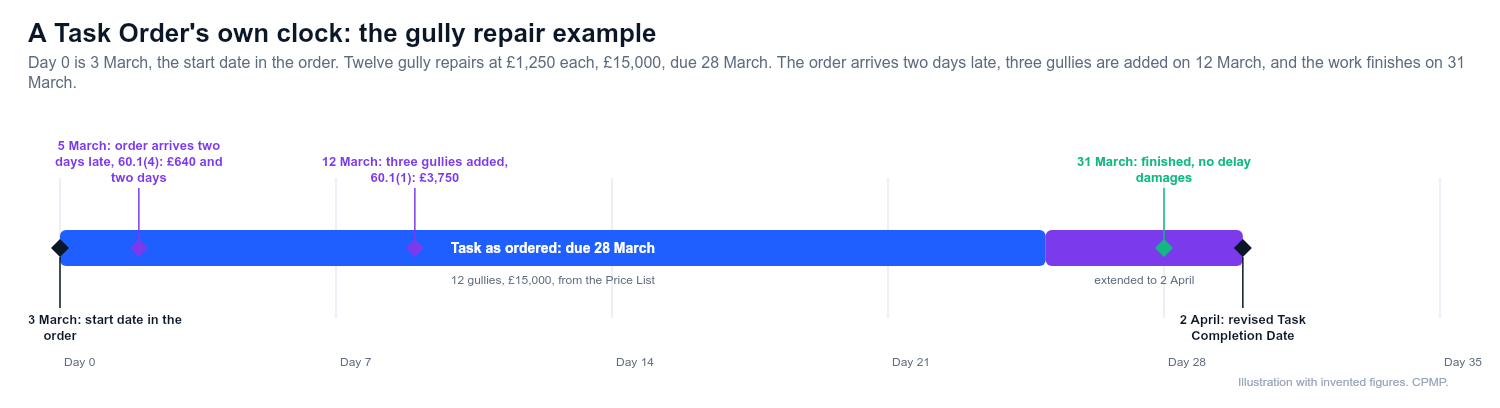
An invented drainage contract. The Service Manager orders 12 gully repairs at £1,250 each (£15,000), starting 3 March and due 28 March.
- The order reaches you on 5 March, two days after its start date. You notify an event under 60.1(4). Because the crew was held back, you quote £640 and two days.
- Later, on 12 March, three extra gullies are added by the Service Manager. That is a change to the Task, 60.1(1), but it only alters a listed quantity, so it is priced at £1,250 x 3 = £3,750 and the Task Completion Date moves five days to 2 April.
- You finish on 31 March, so no delay damages apply.
Keep a register
Hundreds of orders need simple control. Record, for each: number, date issued and date you received it; location; priced from the list or quoted; start date and current completion date; whether a task programme is needed and accepted; linked events; and price, status and payment date. Review it monthly alongside the payment assessment.
What goes wrong
- Backdated orders. Work begins on a call and paper follows. Record the date you actually got it.
- A big job treated as routine. A major renewal may need a proper programme and quotation, or its own contract.
- Confusing change with a new order. Extending an existing Task is an event; a fresh Task is not.
- Wrong event numbers. ECC numbers do not match the TSC, and a notice with a wrong reference invites argument.
Related guides
This guide is general information, not legal advice. Check it against your contract.