
An instruction conflicts with the Scope or the contract: what to do
You have been given an instruction that seems to contradict the Scope or the contract. How to query it, protect yourself and notify any compensation event.
On this page
An instruction arrives, perhaps by email or in a meeting, and it does not square with the Scope (Works Information in NEC3) or with the contract. You are not sure whether to follow it, query it or ignore it. This guide is from the Contractor's side. A Subcontractor will face the same issue with instructions passed down from the Contractor.
The short answer
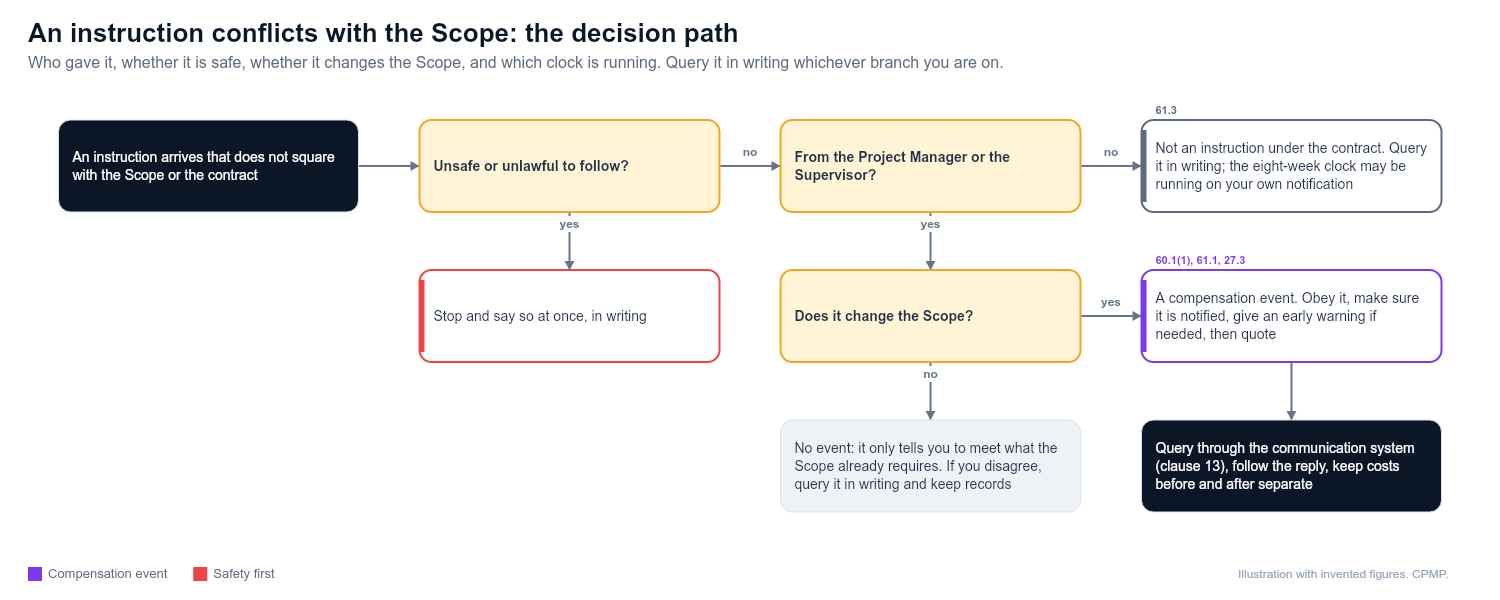
Do not ignore it and do not silently comply. Query it in writing through the contract's communication system, say what conflicts and with what, and ask the Project Manager to confirm. If the instruction comes from the Project Manager and changes the Scope, it is a compensation event (60.1(1)), the Project Manager should notify it at the same time (61.1), and you must obey it (27.3) while the price is sorted out. If the "instruction" does not change the Scope, or does not come from the Project Manager or Supervisor, the eight-week clock under clause 61.3 may be running on your own notification.
What to do, step by step
- Check who gave it. Was it the Project Manager or Supervisor, or someone else? Only the people with authority under the contract can instruct.
- Check the form. Communications must follow the contract's rules (clause 13). Look at the Contract Data for the system and form.
- Identify the conflict. Put the instruction beside the Scope clause, drawing, specification or contract term it appears to contradict. Be specific.
- Check for safety or legal issues. If following the instruction would be unsafe or unlawful, stop and say so at once.
- Query it in writing. Say what you were instructed, what it conflicts with, and what you intend to do unless told otherwise. Ask for confirmation of which prevails.
- Give an early warning if the conflict could affect cost, time or quality.
- Notify a compensation event if the instruction changes the Scope, or if the Project Manager's answer does, and the Project Manager has not already notified it. Not every instruction is an event: one that only tells you to meet what the Scope already requires changes nothing, and a change to your own design to fit the Scope, or to accept a Defect, is excluded from 60.1(1). Put the Scope and the instruction side by side and identify what you now have to do that you did not before. Do not wait for a long exchange to end.
- Follow the Project Manager's reply. If the instruction is confirmed, carry it out and keep records. If it is withdrawn, record that too.
- Use the ambiguity clause where the documents contradict each other. Under clause 17.1 (NEC3 and NEC4), whoever spots an ambiguity or inconsistency tells the other straight away, and the Project Manager says how it is to be resolved. If that changes the Scope it is a compensation event, assessed on the reading most favourable to the Party that did not provide the Scope (63.10 in NEC4, 63.8 in NEC3). The standard clause does not rank the documents, so check whether a Z clause or the Scope sets an order of precedence. If the Scope requires something illegal or impossible, 17.2 in NEC4 (18.1 in NEC3) applies instead, and the Project Manager instructs a change to the Scope.
What to record
- The instruction itself, with date, sender and how it arrived.
- The clause, drawing or specification it conflicts with.
- Your query and the reply, with dates.
- Work done before and after the query, with costs separated.
- Photographs and site diary entries.
- Any meeting where it was discussed.
- Early warnings and compensation event notifications.
What not to do
- Do not follow a conflicting instruction without comment and assume you can claim later.
- Do not refuse to proceed without telling anyone why.
- Do not rely on a verbal answer. Get it in writing. See told on site to do extra work.
- Do not assume the Scope always wins. The standard contract does not rank documents, and an instruction from the Project Manager that changes the Scope is a change you carry out, not a breach.
- Do not query vaguely. "Please clarify" gets a vague answer.
- Do not let the query sit. Where the eight-week period in 61.3 applies to your event, it runs from when you become aware.
When to get help
Ask your commercial manager when the instruction affects cost or Completion Date, or when the Project Manager insists. Get legal advice if you are being told to do something the contract does not allow, or if there is a safety or statutory issue. Ask a planner to assess programme effect.
Example
A Contractor receives an email telling it to use a different pipe material from the one in the Scope. It replies the same day through the communication system, quoting the Scope clause, asking the Project Manager to confirm the change, and giving an early warning about lead times. The Project Manager confirms. The Contractor notifies a compensation event and starts a quotation.
Related guides
- Compensation events in plain English
- Compensation event notification checklist
- Notice sent by email, not the communication system
- Avoiding disputes under NEC
This guide is general information, not legal advice. Check it against your contract.