
Completion, take over and the Defects Date explained
How Completion, take over and the Defects Date fit together under NEC, why they matter for payment and risk, and what to check in your contract.
On this page
Completion, take over and the Defects Date are closely linked but they are not the same thing. Confusing them leads to disputes about completion damages, when risk passes, and when Defects can be notified. This guide explains how they fit together under the ECC. The wording differs between NEC3 and NEC4, so check your version and any Z clauses.
Completion
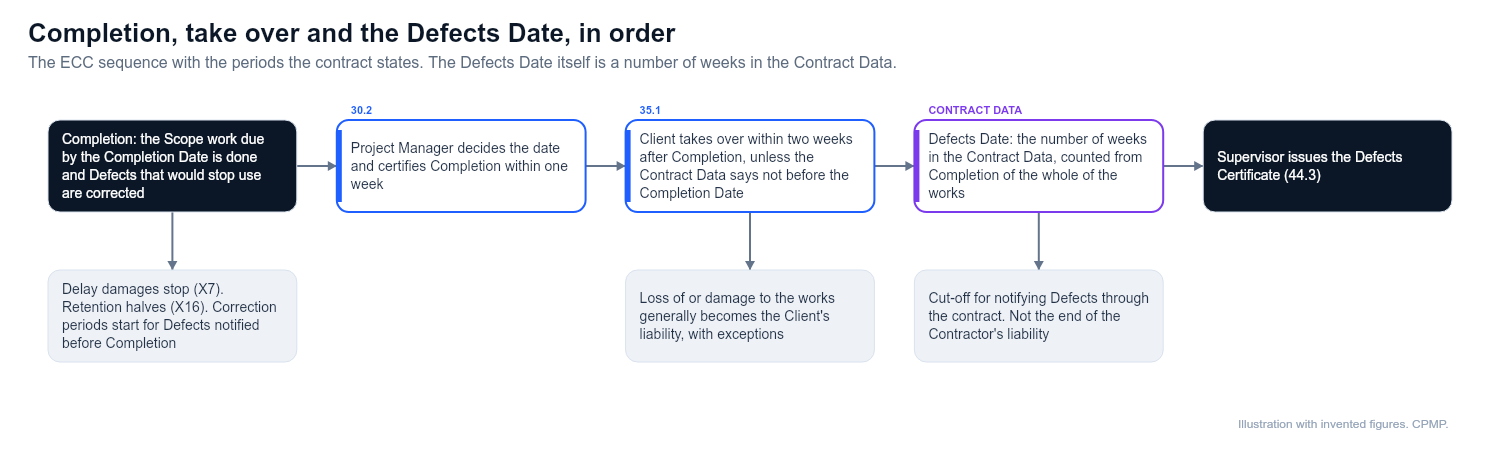
Completion is a defined term. It means the Contractor has done all the work which the Scope says is to be done by the Completion Date, and has corrected notified Defects that would have stopped the Client from using the works. It is not the same as the Completion Date, which is the date by which Completion is required.
The Project Manager decides the date of Completion and certifies it within one week of that date (clause 30.2). The date certified is when Completion actually happened, not the day the certificate was written, and the Contractor cannot self-certify. If the Project Manager does not certify when you think it has occurred, see What to do when the Project Manager will not certify Completion.
Completion matters because:
- It stops delay damages running, if Option X7 applies (or at an earlier take over of the whole).
- It is the starting point for the Defects Date, which the Contract Data counts in weeks from Completion of the whole of the works, and it is when the correction period starts for Defects notified before it.
- It halves the amount held as retention, if Option X16 applies.
- It ends the duty to submit revised programmes once the whole of the works is complete.
- It sets the Client's take over (see below).
Take over
Take over is when the Client takes over the works. Under clause 35.1 the Client takes over within two weeks after Completion, unless the Contract Data says the Client is not willing to take over before the Completion Date. The Client can also end up taking over part of the works before Completion: if it starts to use a part, that part is treated as taken over (35.2), unless the Scope gives a reason for the use or it suits the Contractor's way of working. The Project Manager certifies the date and extent of take over within one week (35.3). From take over, loss of or damage to the part taken over generally becomes the Client's liability, with exceptions such as a Defect that existed at take over.
Things to check:
- Whether the Contract Data says the Client will not take over before the Completion Date
- What the Scope says about the Client's use of any part before Completion
- How early take over of a part affects delay damages (reduced in proportion to the benefit, if Option X7 applies) and the Defects Date, which still counts from Completion of the whole
- The effect on insurance. Take over before both Completion and the Completion Date is a compensation event (60.1(15))
If the Client wants early use, see The Client wants to use or take over part of the works before Completion.
The Defects Date
The Defects Date is a number of weeks, stated in the Contract Data, counted from Completion of the whole of the works. It is the cut-off for the contract's process of searching for and notifying Defects (clauses 43.1 and 43.2 in NEC4; 42.1 and 42.2 in NEC3). It is not the end of the Contractor's liability, and it is different from the defect correction period, which is the time allowed to put right each notified Defect. The Supervisor can notify Defects up to the Defects Date, and the Contractor must correct them. The Supervisor then issues the Defects Certificate (44.3 in NEC4, 43.3 in NEC3). See Defects under NEC: how the process works in plain English.
How the three fit together
| Event | What it means | Who acts |
|---|---|---|
| Completion Date | The date by which Completion is required | Set in the contract and programme |
| Completion | Work done and Defects that stop use corrected | Project Manager certifies |
| Take over | The Client takes over the works | Project Manager certifies |
| Defects Date | Cut-off for notifying Defects through the contract's process | Contract Data weeks, counted from Completion of the whole |
| Defects Certificate | Lists notified Defects not corrected, or says there are none | Supervisor issues |
Common problems
- Completion argued against minor items. Not every outstanding item stops Completion. There are two tests: the work the Scope says is to be done by the Completion Date, and notified Defects that would stop the Client using the works or Others doing their work. Unfinished work the Scope lists for the Completion Date holds up Completion even if it is small, while a minor notified Defect that does not prevent use does not. If the Scope lists nothing, the test falls back on what the Client needs in order to use the works and what Others need to do theirs. Keep that wording in front of you.
- No certificate. Without a certified date the periods cannot be calculated, so ask for it in writing and keep the evidence that you met the definition.
- Sectional Completion. If Option X5 is used, the contract divides the works into sections, and each has its own Completion Date and Completion. Check the Contract Data. See Key Dates and sectional Completion.
- Z clauses. Some contracts change the definition of Completion or require extra deliverables, such as operation and maintenance manuals, health and safety file or commissioning records, before it is achieved. Read the amendments.
- Programme. A programme that does not show commissioning, testing, handover documents and the Client's own pre-use activities will not support a credible Completion date.
What to do before you reach Completion
- Make a list of what the Scope requires, including documents and tests
- Agree with the Supervisor what remains and how it will be treated
- Update the programme so it shows the true remaining work
- Write to the Project Manager when you believe Completion has been reached
Related guides
- What to do when the Project Manager will not certify Completion
- Key Dates and sectional Completion
- How payment works under NEC
This guide is general information, not legal advice. Check it against your contract.