
How to show a compensation event on the programme, step by step
A worked example with programme pictures: the Accepted Programme, progress to the dividing date, the event inserted, and the dates the quotation claims.
On this page
- The scenario
- Step 1. Start from the Accepted Programme in force at the dividing date
- Step 2. Bring it up to the dividing date, honestly
- Step 3. Insert the event as a fragnet
- Step 4. State what moves, and by how much
- What the Project Manager and the Client expect to see
- What goes wrong
- If there is no Accepted Programme
- Related guides
A compensation event (an event under clause 60.1 that entitles you to time or money) only earns you time if the programme shows it earning time. The rule is simple to state and easy to get wrong: you take the Accepted Programme in force at the dividing date, bring it up to date, add the event, and the amount planned Completion moves is the delay. The Completion Date moves by that amount (NEC4 ECC 63.5; NEC3 ECC 63.3, which does not mention the dividing date).
This guide walks one invented event through that process with four programme pictures, then lists what the Project Manager and the Client will expect to see in the quotation.
The scenario
A water main renewal. The Contractor is laying 600mm of new main along a road and tying in at chainage 450. The contract is NEC4 ECC Option C, with a Key Date for the main being live to the treatment works and a Completion Date of 4 November 2026.
On 12 February the excavation team exposes an unmapped 300mm main crossing the trench line at chainage 450. It is not on the Site Information. The Contractor gives an early warning the same day and notifies a compensation event (clause 61.3 allows eight weeks, but there is no reason to wait). The event is notified by the Contractor, so the dividing date is 12 February, the date of the notification.
Two complications make it realistic. First, the excavation had already run three weeks late for the Contractor's own reasons. Second, the utility that owns the main will not let the Contractor touch it: the utility surveys, designs and diverts it in its own time.
Step 1. Start from the Accepted Programme in force at the dividing date
Find the most recent programme the Project Manager had accepted on or before the dividing date. Here that is revision 7, accepted in January with a data date of 20 January. Note its planned Completion and the gap to the Completion Date: that gap is terminal float, and it is yours.
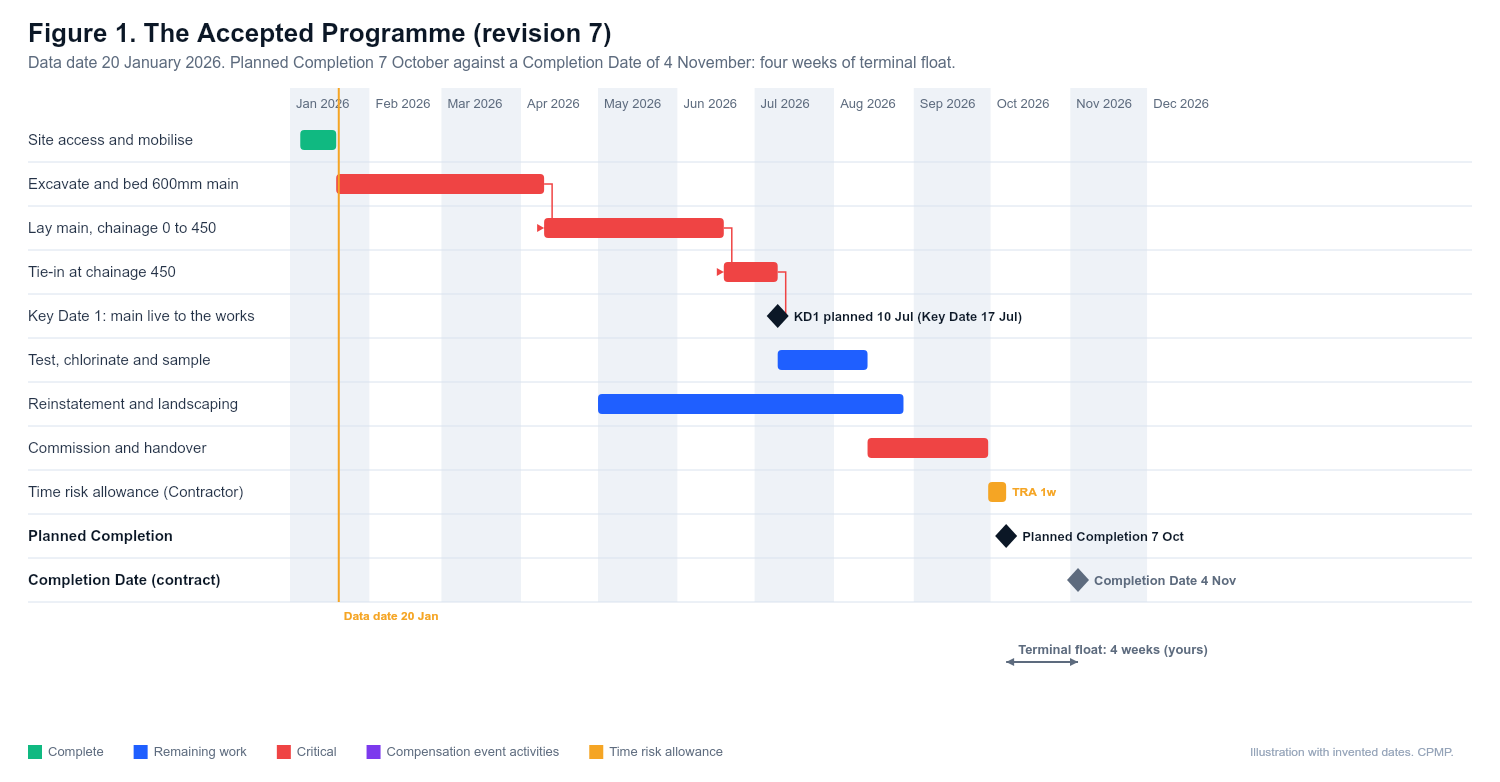
What to check before you go further:
- Is this really the programme in force on the dividing date, not a later revision that already shows the delay, and not an older one?
- Does it show the critical path, time risk allowances and Key Dates clearly? If it does not, the assessment will be argued over. See what a programme must show.
Step 2. Bring it up to the dividing date, honestly
NEC4 63.5 expects the assessment to take account of delay already caused and of events between the programme's data date and the dividing date. In practice that means rolling progress forward to the dividing date from your records, including your own slippage.
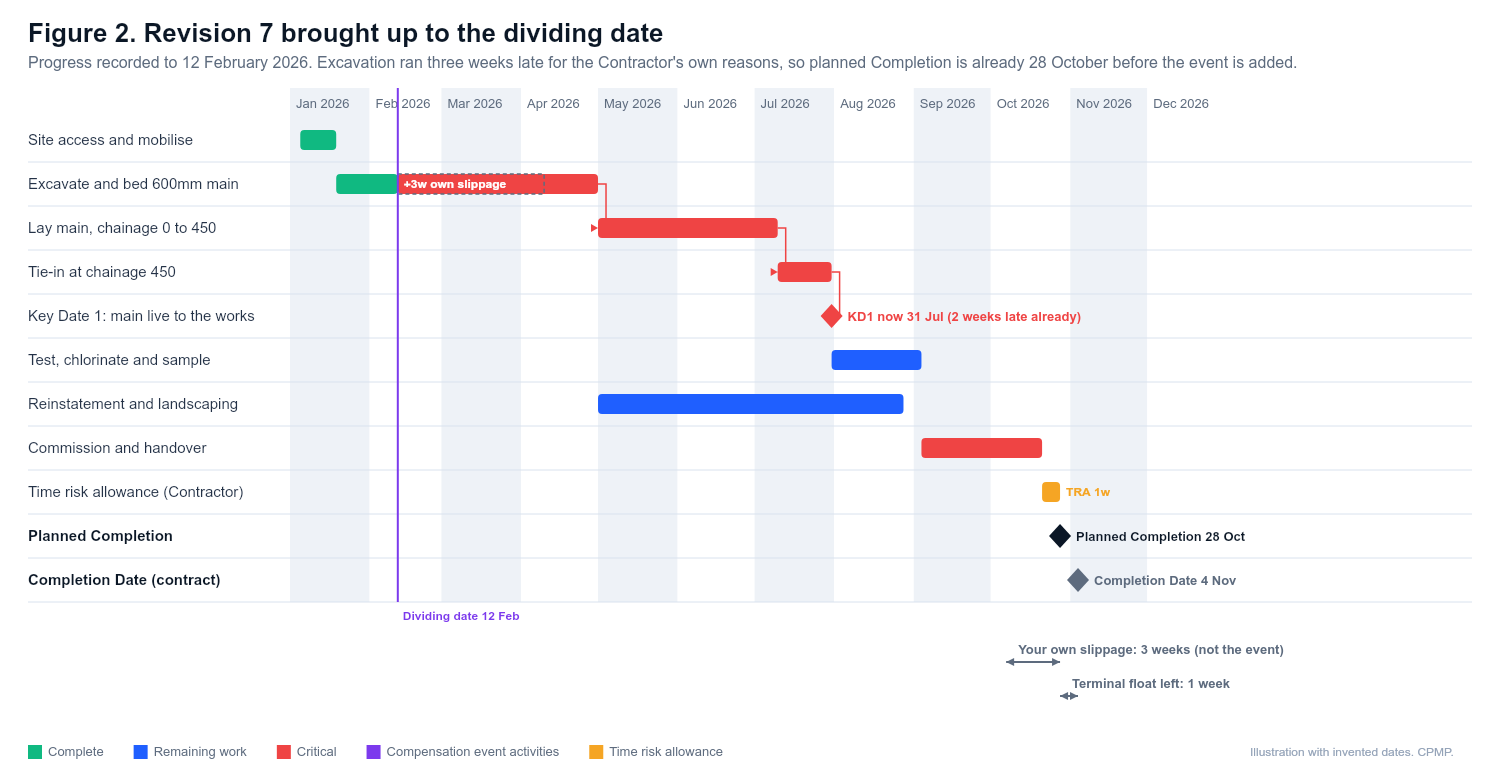
This step is where contractors lose credibility. If you skip it and measure the event against the original 7 October date, your three weeks get passed off as the Client's. A Project Manager who spots it will question everything else in the quotation. Put your own slippage in plainly; the method still protects your float.
Step 3. Insert the event as a fragnet
A fragnet is a small network of new activities that describes the event, with logic tying it into the existing programme. Build it the way the work will really happen, with durations you can defend:
| Activity | Duration | Logic |
|---|---|---|
| Expose and survey the main | 3 days | After the excavation reaches chainage 450 |
| Utility designs and prices the diversion | 10 days | After the survey; the utility's own stated lead time |
| Utility diverts the main in its window | 10 days | After the design; the Contractor cannot start laying through chainage 450 until it is done |
| Risk allowance for the event | 2 days | Allowed under NEC4 63.8 for risk with a significant chance of occurring, here the utility window slipping |
Then run the schedule. Only the event's activities and their logic should change; if you find yourself re-sequencing unrelated work, stop and ask why.
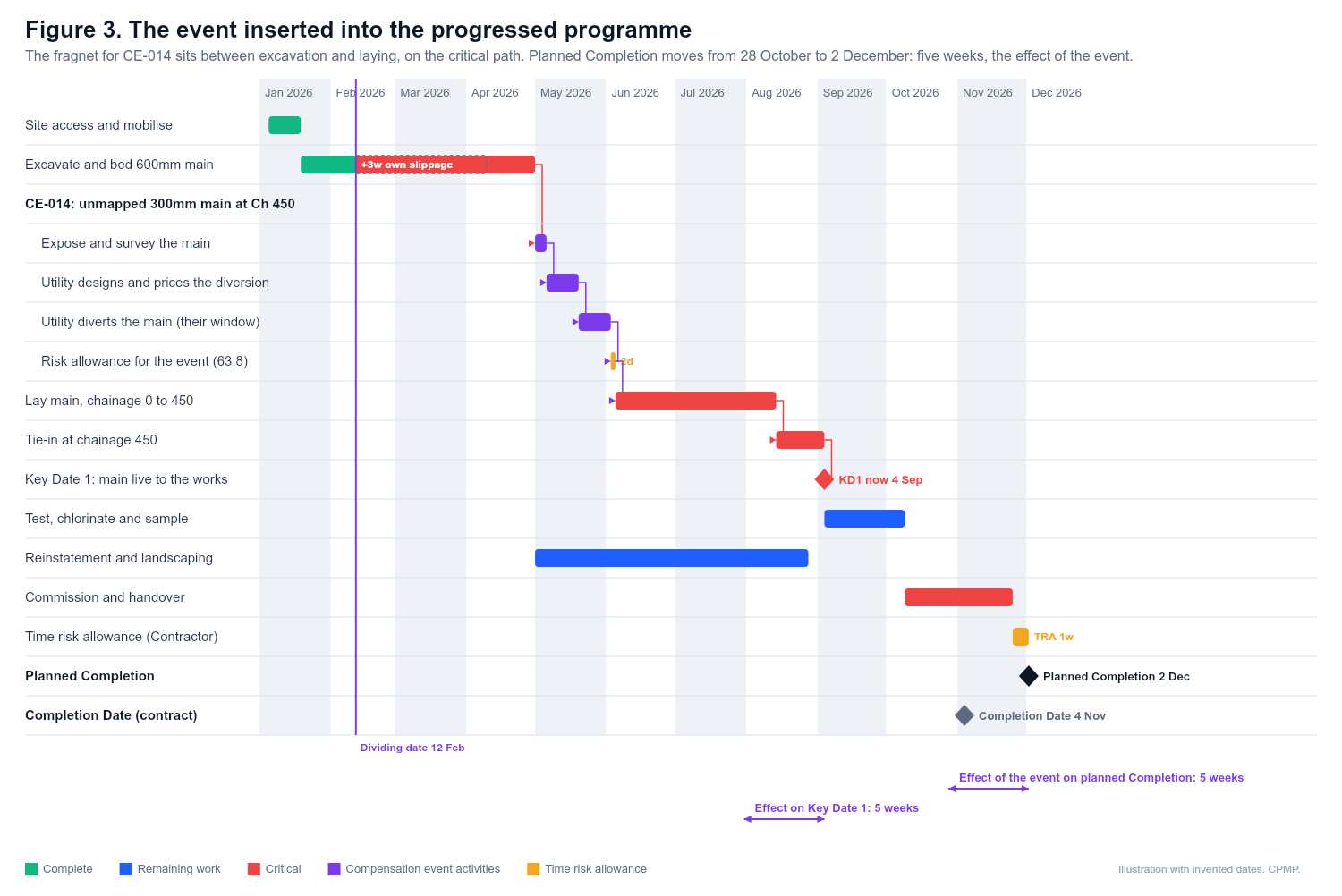
Read off two numbers for each date that matters: planned Completion with and without the event, and the planned date for meeting each Key Date's Condition with and without the event. The difference is the effect of the event. Here it is five weeks for both.
Step 4. State what moves, and by how much
The quotation claims a change to the Completion Date equal to the delay to planned Completion, and the same for each affected Key Date (62.2). It does not claim the three weeks of your own slippage, and it does not give up the terminal float you still hold.
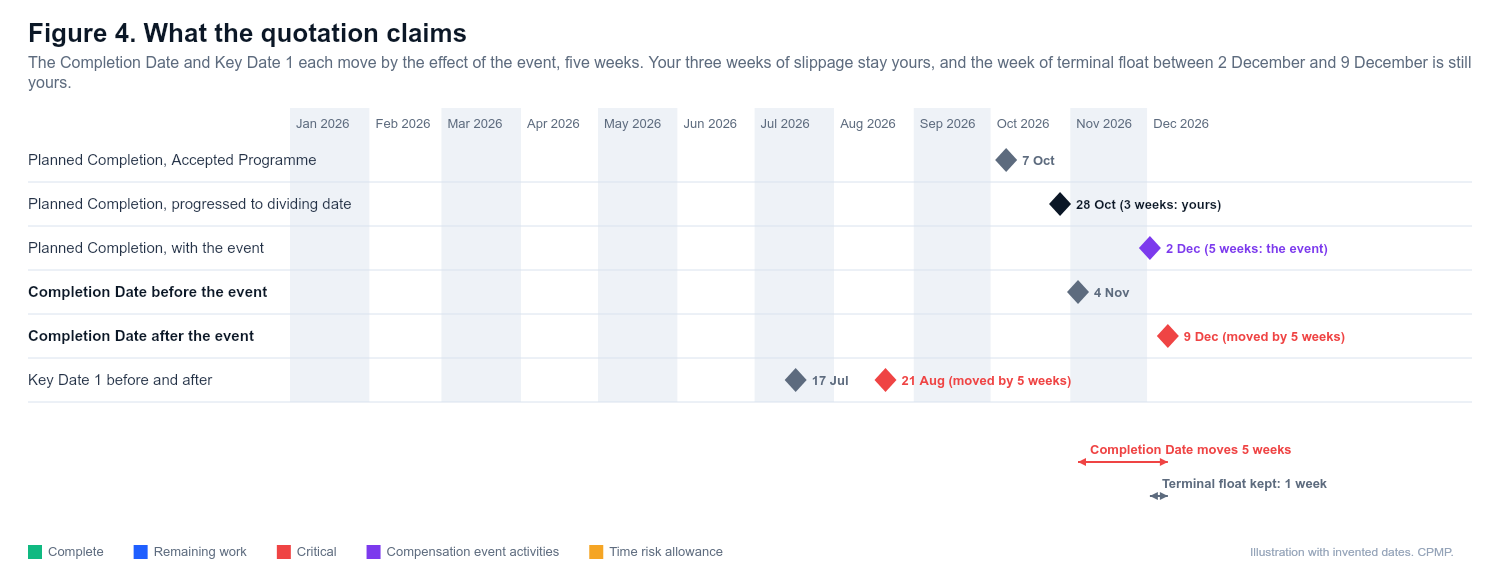
Write the dates out in a table in the quotation: before, after, and the difference, for the Completion Date and every Key Date. Do not leave the reader to infer them from a bar chart.
What the Project Manager and the Client expect to see
A reviewer on the Client's side will go looking for the following. If you provide them unasked, the quotation moves faster and the number is less likely to be cut.
- The right baseline, named. "Accepted Programme revision 7, accepted 26 January, data date 20 January, the programme in force at the dividing date of 12 February."
- The dividing date and how you fixed it. For an event you notified, the notification date; for an instruction, notification, certificate or changed decision from the Project Manager or Supervisor, the date of that communication.
- A progressed programme to the dividing date, with the progress records that support it, and your own delay shown as yours.
- The fragnet on its own: the activities, durations, logic and the evidence behind the durations (the utility's letter, the survey, the permit).
- The impacted programme, as a native file (XER or equivalent) as well as a PDF, so the logic can be checked rather than taken on trust.
- A before-and-after table of planned Completion, the Completion Date and every Key Date.
- Risk allowances itemised and justified, not buried in durations.
- Mitigation considered. What you did to reduce the effect (re-sequencing other work, working elsewhere while the utility diverted) and why the remaining delay could not be avoided. Acceleration is a separate route under clause 36 and is never assumed.
- The money, built on the same programme. The time-related cost should fall out of the same five weeks, priced under the rules for your Option.
What goes wrong
- Measuring against the Completion Date instead of planned Completion, and being told "you still have float".
- Using the latest programme, which already shows the delay, so the event appears to cause nothing.
- Hiding your own slippage inside the event.
- Changing logic elsewhere in the programme while the fragnet goes in.
- Consuming your time risk allowances to absorb the event. They are for your risks, not the Client's.
- Claiming only the Completion Date and forgetting the Key Dates.
- Sending a PDF bar chart and nothing else.
If there is no Accepted Programme
If no programme has been accepted, or a required one was not submitted, the Project Manager assesses the programme for the remaining work themselves (64.1, 64.2), and that figure is what gets implemented unless you challenge it. Keeping a programme accepted every month is the cheapest insurance there is. See how the programme measures delay from a compensation event and when the Project Manager assesses.
Related guides
- How the programme measures delay from a compensation event
- Compensation event quotation: template and guide
- Terminal float
- Delay analysis basics
This guide is general information, not legal advice. Check it against your contract.