
How the programme measures delay from a compensation event
The step-by-step method NEC uses to turn a compensation event into extra time, with what goes wrong when there is no usable programme.
On this page
When a compensation event (a change or problem the contract says entitles you to time or money) hits your job, NEC works out the extra time from the programme. You take the Accepted Programme in force at the dividing date, add the event, and see how far planned Completion and any planned Key Date move. That movement is the delay, and the Completion Date or Key Date moves by the same amount.
This is NEC4 ECC 63.5 and NEC3 ECC 63.3, though the NEC3 wording does not mention the dividing date.
In plain English
Run the same programme twice, once without the event and once with it. The gap between the two is your time entitlement, and your own earlier slippage must stay out of it.
The method
- Find the dividing date. If the event is an instruction, notification, certificate or changed decision, use that document's date. For anything else, use the date you notified the event (NEC4 63.1).
- Choose the programme. Take the most recent Accepted Programme in force on or before the dividing date, and note its revision and acceptance date.
- Update it with the facts. NEC4 63.5 expects you to allow for delay the event has already caused and for events between the programme date and the dividing date. Roll progress forward to the dividing date from your records.
- Insert the event. Add the new or changed activities with sensible durations and logic. Justified risk allowances may go in (NEC4 63.8, NEC3 63.6).
- Compare. Look at planned Completion, and the planned date for meeting each Key Date's Condition, with and without the event.
- Put it in the quotation. Show the delay with your assessment details and any changes to the programme for the remaining work (62.2).
Example: an added contact tank
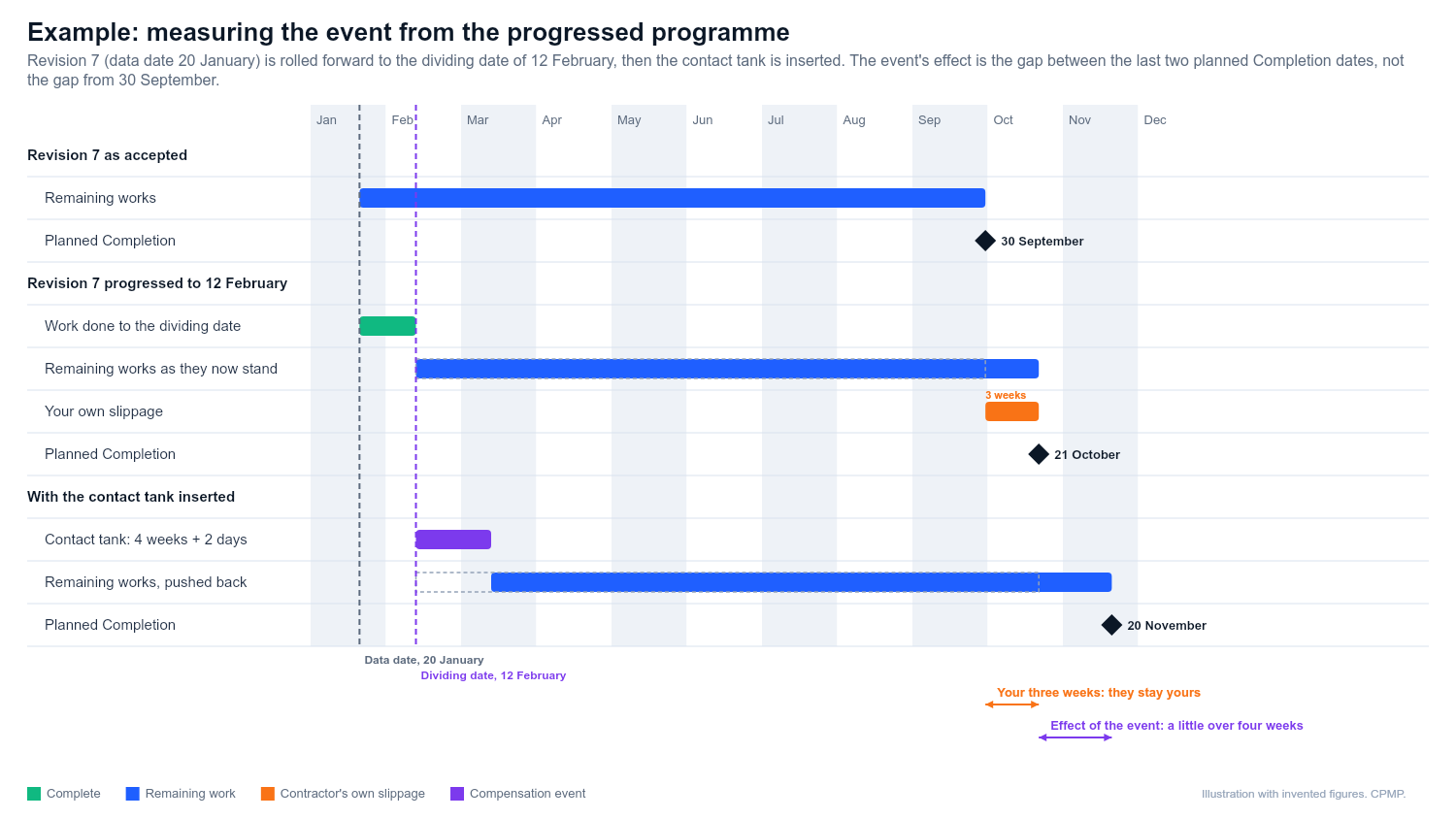
A water treatment works upgrade, invented dates. The dividing date is 12 February. The latest Accepted Programme is revision 7, data date 20 January, planned Completion 30 September.
- Roll revision 7 forward to 12 February with what really happened, including three weeks of your own slippage: planned Completion is now 21 October.
- Insert the instructed contact tank, four weeks of extra critical work plus two days of risk allowance: planned Completion becomes about 20 November.
The event's effect is the gap between those last two dates, a little over four weeks. It is not the gap from 30 September. Without step 3 your own three weeks would be passed off as the Client's. The Completion Date moves by about four weeks. Your three stay yours unless you recover them.
Does every event need a full run?
No. A small event with no critical effect can be explained in a short note showing the float and logic. Bigger or overlapping events are where native files and an updated programme repay the effort. The assessment assumes you react competently and promptly and that cost and time are reasonably incurred (NEC4 63.9, NEC3 63.7). So show the method a competent contractor would choose, not the longest one.
When there is no usable programme
- No Accepted Programme at all: the Project Manager assesses the programme for the remaining work themselves (64.2).
- A required programme or alteration was not submitted: the Project Manager assesses the event using their own view (64.1, 64.2).
- Your latest programme was refused for a listed reason: same result.
- A revision is waiting for a reply: use the Accepted Programme in force on the dividing date (63.5), and show the pending revision for context.
Their figure is what gets implemented unless you challenge it through the dispute procedure, and you lose the chance to put your case first. See Project Manager assessments.
What to expect from the Project Manager
A reviewer will ask: right programme for the dividing date? Real progress applied? Logic changed outside the event's activities? Do float figures move only for reasons the event explains? Are risk allowances justified and not counted twice? Have Key Dates been tested as well? Any difference can lead to discussion, a request for a revised quotation (62.4), or their own assessment (64.1).
An assessment is a forecast made at the dividing date. Once implemented it is not normally revisited because later facts proved the forecast wrong (NEC4 66.3). You usually get one attempt, so get it right.
Related guides
- Delay analysis basics
- Quotations for compensation events
- What is the Accepted Programme?
- Terminal float
This guide is general information, not legal advice. Check it against your contract.