
Work stopped for months: can you terminate the NEC contract?
When a stop instruction has dragged on, here is the test for terminating under clause 91.6, the weeks to count, and how the reason sets what you are paid.
On this page
Your site has been told to stop, weeks have gone by, and nobody is saying when you can start again. You want to know whether you can walk away and be paid for it.
The short answer
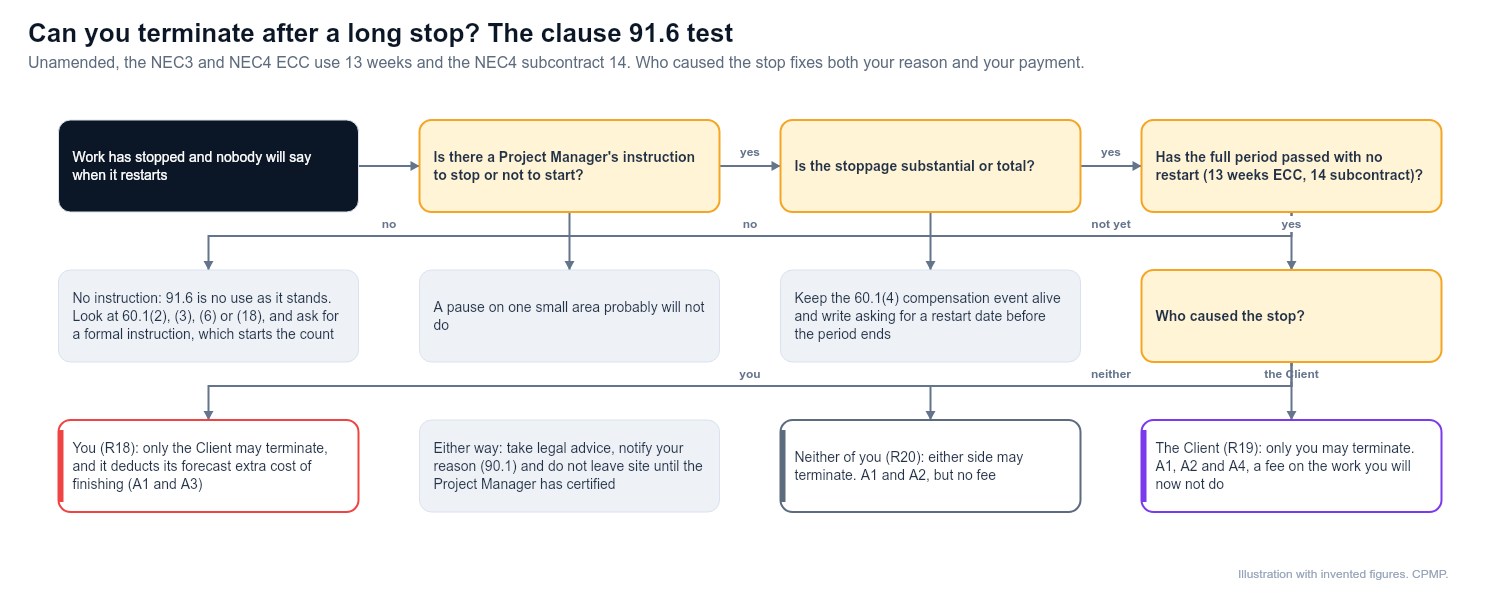
Possibly, but only if a formal instruction from the Project Manager (the person the Client appoints to run the contract day to day) caused the stop and the full period has passed with no restart. The clause needs substantial or total stoppage, and it must not be your own default. A site that has just gone quiet does not qualify. Find the instruction, count from its date, and decide whose fault the stop was, because that fixes both your reason and your payment.
What to do, step by step
- Find the instruction. Note its date, what it covers and the reason given. If you cannot find one, ask the Project Manager to confirm the position in writing.
- Check the work stopped is substantial. A pause on one small area probably will not do.
- Count the weeks. Read the period in your own clause 91.6. Unamended, the NEC3 and NEC4 ECC use 13 weeks and the NEC4 subcontract uses 14. In the subcontract, an instruction taking the work out of the Subcontract Scope also ends the count, so check none has arrived.
- Keep the compensation event alive. Your right under clause 60.1(4) carries on whatever you decide about leaving, so keep revising assumptions and quotations while the stop continues.
- Write before the period ends. Ask when a restart is expected. That gives the Client a fair chance to act, and it strengthens your file.
- Price both routes. Often a negotiated exit, or a restart on revised prices, beats what the Termination Table would pay.
- Take legal advice, then notify the Project Manager and the Client with your reason (clause 90.1).
- Wait for the certificate. Do not leave site until the Project Manager has certified.
The reason depends on who caused the stop:
- The Client caused it (reason R19): only you may terminate, and you recover A1, A2 and A4, which brings a fee on the work you will now not do.
- Something neither of you caused, such as a third party or a planning problem (R20): either side may terminate. You recover A1 and A2 but no fee.
- You caused it (R18): only the Client may terminate, and it deducts its forecast extra cost of finishing (A1 and A3).
Expect the R19 versus R20 question to be the main argument, since the difference in money can be large. Note that R20 also lets the Client end things, so a long pause can cut both ways.
What to record
- The date, wording and sender of the stop instruction and any later correspondence about restarting.
- What was stopped, what remained working, and any partial restart.
- Your standing costs week by week while idle.
- The cause of the stop and who was responsible.
- Your requests for a restart date and the replies.
What not to do
- Do not assume silence on site counts as a stop instruction.
- Do not leave site before the certificate arrives.
- Do not stop updating your compensation event quotations.
- Do not terminate on a reason that does not fit: you risk being the party in breach, and the Project Manager ought to refuse the certificate.
- Do not let the count start from the day you complained rather than the day of the instruction.
When to get help
Bring in your commercial manager as soon as the stop passes a few weeks, and a lawyer before you serve notice. Ask a planner to rebuild the programme impact if the Client disputes how much work was stopped. If the Project Manager refuses to certify, the disagreement goes through your dispute Option; see adjudication under NEC.
Where nothing was ever instructed and the job simply starved of access, information or decisions, clause 91.6 is no use as it stands. Look instead at the compensation events in 60.1(2), 60.1(3) or 60.1(6), or at breach under 60.1(18). Unpaid sums follow another route, covered in can a contractor terminate. Asking the Project Manager for a formal instruction is reasonable: it starts the count.
Example
A fictional river-intake job. In early March the Project Manager orders all work on the screen chamber to stop after a neighbour challenges the Client's licence. Thirteen weeks pass with no restart. The challenge is not the Client's default, so the contractor looks at R20: costs and removal, but no fee. Before serving notice it proposes a restart on new dates and sets itself a decision deadline. Everything here is illustrative.
Related guides
- Can a contractor terminate?
- Termination under NEC
- What to do when the Project Manager stops work
- Compensation events in plain English
This guide is general information, not legal advice. Check it against your contract.