
Implementing a compensation event: when your price and dates actually change
How NEC clause 66 makes a compensation event final, what changes in your Prices and dates, and the checklist to close the event out properly.
On this page
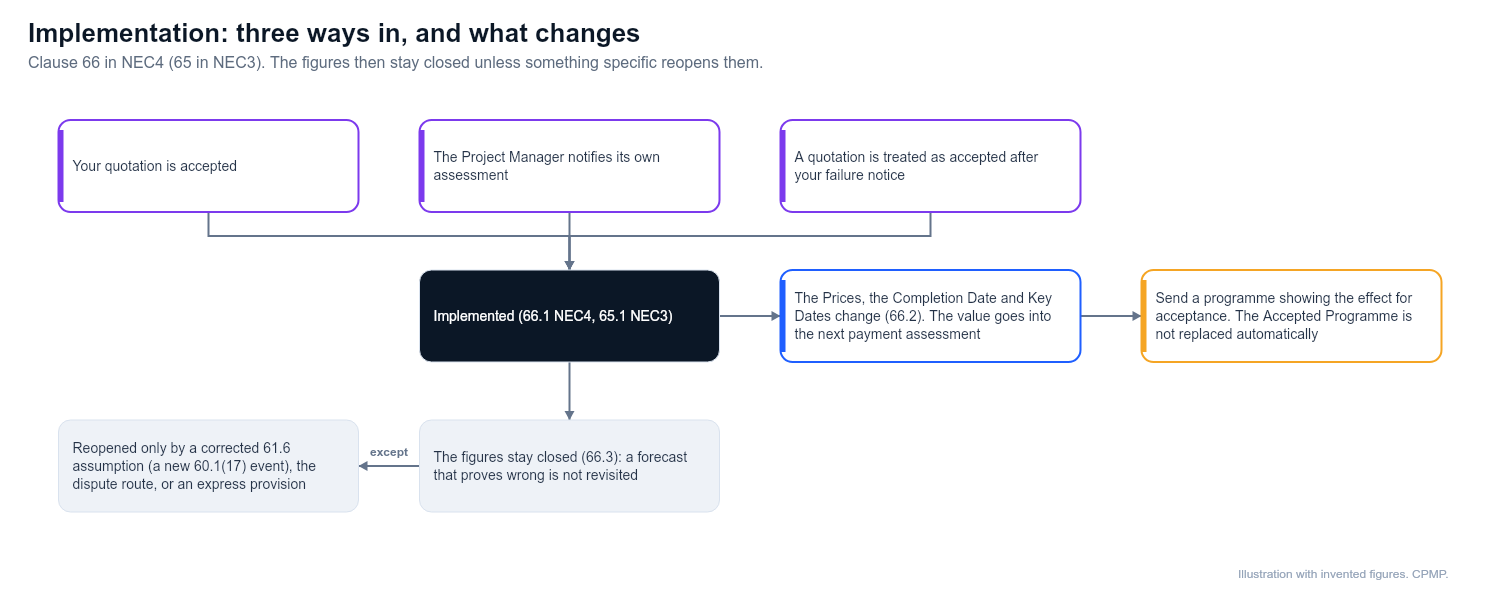
An event is implemented the moment one of three things happens: your quotation is accepted, the Project Manager notifies their own assessment, or a quotation is treated as accepted (clause 66.1 in NEC4, 65.1 in NEC3). From then on your Prices and your dates have changed. The Project Manager is the person the Client appoints to run the contract day to day, and a compensation event is an event the Client carries the risk for.
In plain English
Implementation is the point of no return. The new price and dates apply immediately and, as a rule, the figures are not revisited, even if your forecast turns out wrong.
What the clauses say
| Point | NEC4 ECC | NEC3 ECC |
|---|---|---|
| The three triggers | 66.1 | 65.1 |
| Prices and dates change | 66.2 | Option clauses, plus 65.3 and 65.4 |
| No later revision | 66.3, unless the conditions say otherwise | 65.2, where a forecast is later shown wrong |
What changes and where
- The Prices. Restated in the format your Option works in (an Activity Schedule, a Bill of Quantities, or a fresh forecast).
- Payment. The change flows into the next assessment under your Option's rules for Price for Work Done to Date.
- Completion Date. Moves by the assessed delay. If Option X7 applies, the new date is the one used for delay damages.
- Key Dates. Move in the same way, and a Key Date condition amended under 63.11 takes effect too.
- Accepted Programme. This one is easy to miss. It is not replaced automatically. You must send a programme showing the effect for acceptance, or later assessments will rest on stale information. See revising the programme.
Why the figures stay closed
The contract trades accuracy for an early answer. Take an imagined culvert replacement where you forecast £120,000 and three weeks, but the work costs £150,000 and the delay is two weeks.
| Option | Who carries the extra £30,000 |
|---|---|
| A | You, because you are paid the assessed price whatever the work costs |
| C | You are reimbursed, yet the target was set from the assessment, so the overrun is split by the share percentages |
| E | The Client pays cost, subject to Disallowed Cost, so the forecast is just out of date |
The time works the same way. The Completion Date stays at three weeks even though you needed only two. You have gained a week, just as you would have lost one had it run to four.
What can still reopen something
- A wrong assumption. Where the Project Manager gave an assumption under 61.6 that turned out false, putting it right is a new event under 60.1(17). It can reduce the Prices as well as raise them.
- A dispute. The dispute route can alter an assessment, subject to time limits. See time limits for disputes.
- Express provisions. The NEC4 wording at 66.3 leaves room for revision only where the conditions provide it. Check them and your Z clauses, and do not assume more.
- A fresh event. A later instruction can be a separate event. It does not reopen this one.
Closing checklist
- Make sure the notification states clearly that the event is implemented and how. NEC3 requires the changes to be in that notification.
- Update your Activity Schedule, Bill or forecast.
- Record the new Completion Date and Key Dates, which matters most where delay damages are tied to them.
- Mark the item closed in your compensation event register, noting date, value and days of delay.
- Include the value in your next payment application.
Related guides
- The compensation event process step by step
- Compensation events and the programme
- Open compensation events at the end of a project
- Registers every NEC contract needs
This guide is general information, not legal advice. Check it against your contract.