
Late Access to Site or Working Areas: What to Do Under NEC
The Client has not given access when your programme needs it. Steps to protect time and money, what to record and when to escalate.
On this page
Your programme says you start in a work area on a given date. The date arrives and you cannot get in. This guide is for a Contractor; a Subcontractor in the same position should look at what the Contractor owes under the subcontract.
The short answer
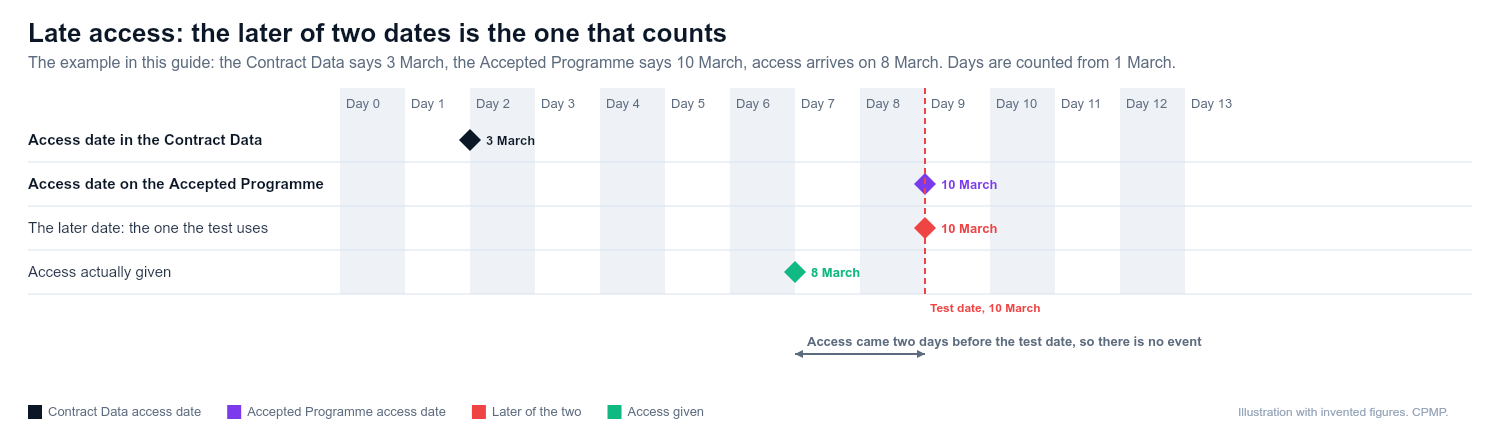
Late access is a compensation event under 60.1(2) when a part of the Site is not available to you to get to and use by the later of two dates: the access date in the Contract Data and the access date on the Accepted Programme. Being late against only one of them is not enough. Tell the Project Manager straight away, notify the event in time, and show the effect on the programme. Your programme position matters, because an accepted programme showing a later access date moves the second date.
What to do, step by step
- Confirm both access dates. Take the access date for the affected part from the Contract Data and the date on the Accepted Programme, and use the later. If the Contract Data date is 3 March, the programme date is 10 March and access arrives on 8 March, there is no event. The test applies part by part, and "use" matters: a gate onto ground still blocked is not real access. If your programme has not been accepted, only the Contract Data date is left to test and you should expect an argument. See why NEC programmes are not accepted and what to do when the Project Manager has not accepted your programme.
- Give an early warning. Tell the Project Manager in writing that access is not available, what is affected, and what you suggest. Clause 15.1 (NEC4) or 16.1 (NEC3) covers early warning.
- Try to work around it. The parties are to act in a spirit of mutual trust and co-operation (clause 10.2). Look for other work that can proceed. Resequencing is reasonable; sitting idle is not.
- Notify the compensation event. No Project Manager instruction caused it, so the eight weeks from becoming aware in clause 61.3 apply in full (seven weeks under the NEC4 subcontract). Do not wait for access to be given before notifying. The Project Manager then has one week to decide (61.4); if it is silent, notify the failure, and two further weeks of silence is treated as accepting that it is an event.
- Keep notifying while it continues. If access is partial or restored late, record the dates of each stage.
- Prepare your quotation. It must include the proposed change to the Prices, any delay to the Completion Date and Key Dates, and a revised programme if the programme for remaining work changes (clause 62.2). In the standard ECC you have three weeks from being instructed to submit it (62.3). Clause 63.9 assumes you react competently and promptly, so redeploying a gang counts. If the date access will arrive is still unknown, ask for an assumption to be stated under 61.6. Check your Contract Data and Z clauses for amended periods.
- Update the programme. Show the delay on the programme you submit under the revised programme clause (clause 32.2), and see revised programme submission timeline.
What to record
- The date access was due and the date it was actually given, area by area.
- Who was on site, what was idle, and what you moved elsewhere.
- Photographs of the blocked area, dated.
- Labour, plant and standing time costs, kept separate from normal work.
- Emails, early warnings and meeting notes about access.
- Reasons given by the Client side for the delay.
- The programme extract showing the access date and critical path effect.
What not to do
- Do not start work in an area you have not been given, particularly if it carries safety risk.
- Do not assume a late-access delay automatically extends the Completion Date. The Completion Date moves only by the amount the event pushes planned Completion later than on the Accepted Programme (63.5 in NEC4, 63.3 in NEC3), so float before planned Completion can absorb the delay, although the cost effect can still be assessed. See delay analysis basics.
- Do not assess time against an out-of-date programme.
- Do not wait until the end of the job to count the cost.
- Do not claim for float you have not shown. See float and time risk allowance explained.
When to get help
Bring in your commercial manager once the delay is more than a few days or the cost is significant. Speak to a planner when you need to show critical path effect, especially if there are several overlapping causes. Take legal advice if the Project Manager says access was not due or disputes the Accepted Programme.
Example
A Contractor's Accepted Programme shows access to a compound on a Monday. The Client's other contractor is still on it. The Contractor writes the same day with an early warning, resequences to an area it already holds, and notifies a compensation event within the week. It records daily what is idle. Access arrives three weeks later. The quotation shows the standing cost and the effect on the Completion Date.
Related guides
- Compensation events in plain English
- Compensation event notification checklist
- Early warning: do I give one?
This guide is general information, not legal advice. Check it against your contract.